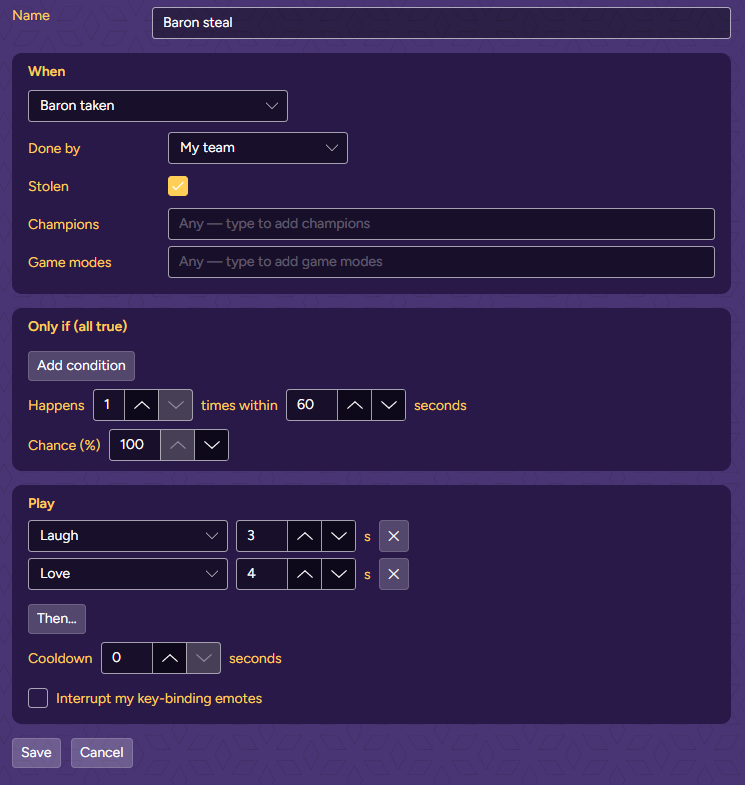
Baron steal
Your team steals Baron from under the enemy’s nose.
- When
- Baron taken
- Filters
- Done by: My team · Stolen: ticked
- Play
- Laugh 3 s → Love 4 s
VariantDone by: Enemy team, play Cry, for when they steal yours.
Rules tell your Mee what to play when something happens: a pentakill, a raid, a sub bomb, a fight at low health. This guide builds your first rules, gives you recipes to copy, and explains every setting.
Animations. A rule plays your Mee’s animations. Every Mee has the five emotions below; some Mees have more. If you pick an animation your current Mee doesn’t have, the rule shows a red warning and is skipped.
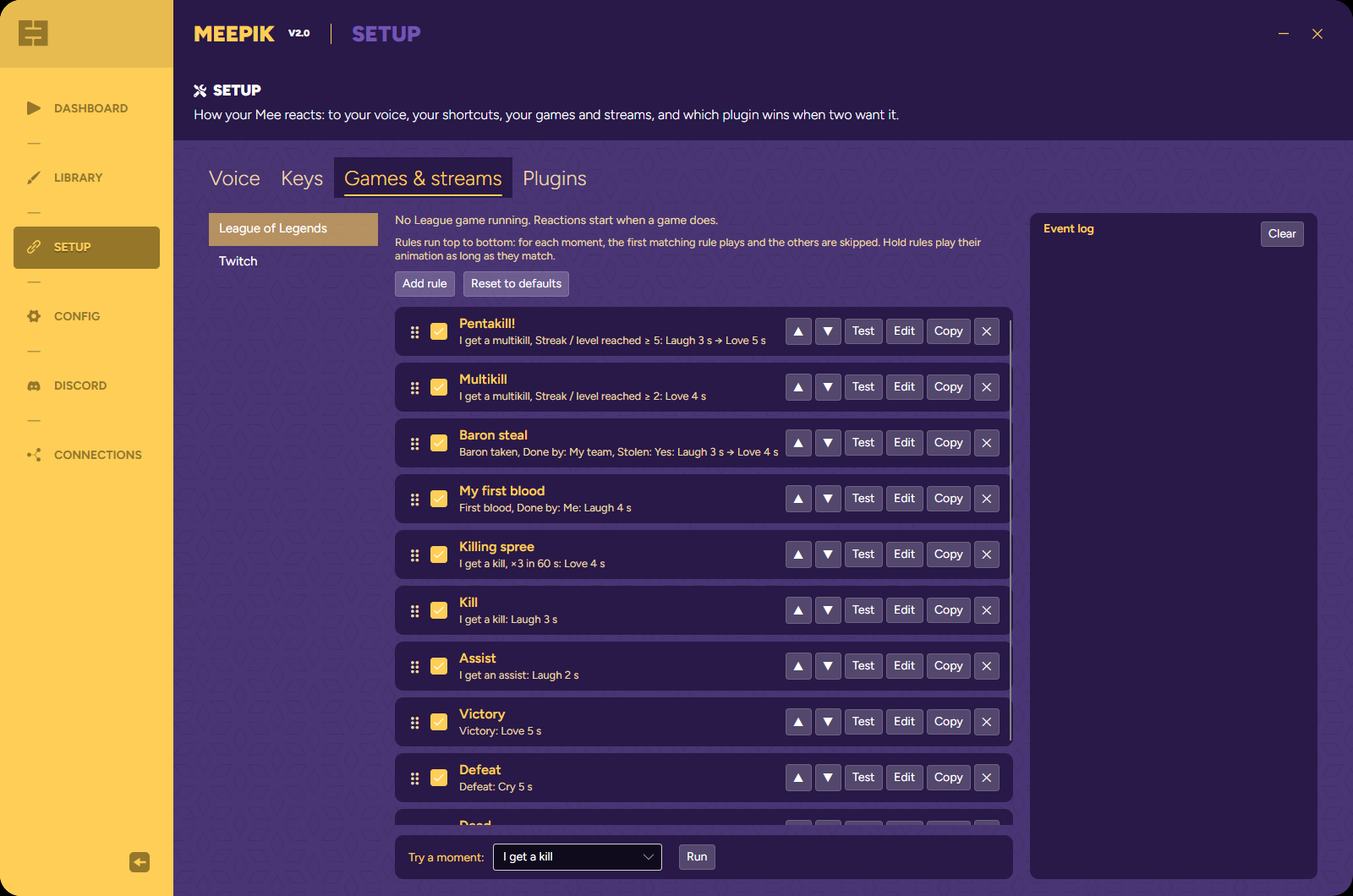
Each plugin has its own list of rules. When something happens in your game or on your stream (a moment), Meepik checks the list from top to bottom. The first rule that matches plays, and the rules below it are skipped. Put specific rules above general ones: Pentakill! above Multikill, Big raid above Raid.
There are two kinds of rules. Moment rules play once, for a kill or a follow. Hold rules (the triggers marked “hold”) keep an animation on your Mee for as long as their conditions stay true, like “while my health is under 20%”.
 1
2
3
4
5
6
7
8
9
1
2
3
4
5
6
7
8
9
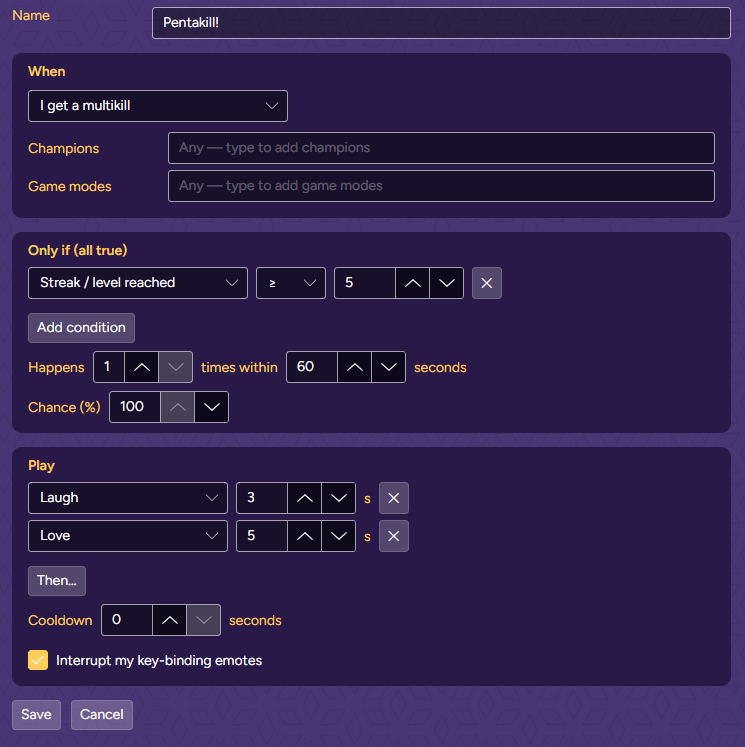
The grey line under each rule’s name sums it up: the trigger, its filters and conditions, then what plays, for example I get a multikill, Streak / level reached ≥ 5: Laugh 3 s → Love 5 s.
Goal: when you get a pentakill, your Mee laughs, then sends love, even if you’re holding a key-binding emote at that moment.
 1
2
3
4
5
6
7
8
9
1
2
3
4
5
6
7
8
9
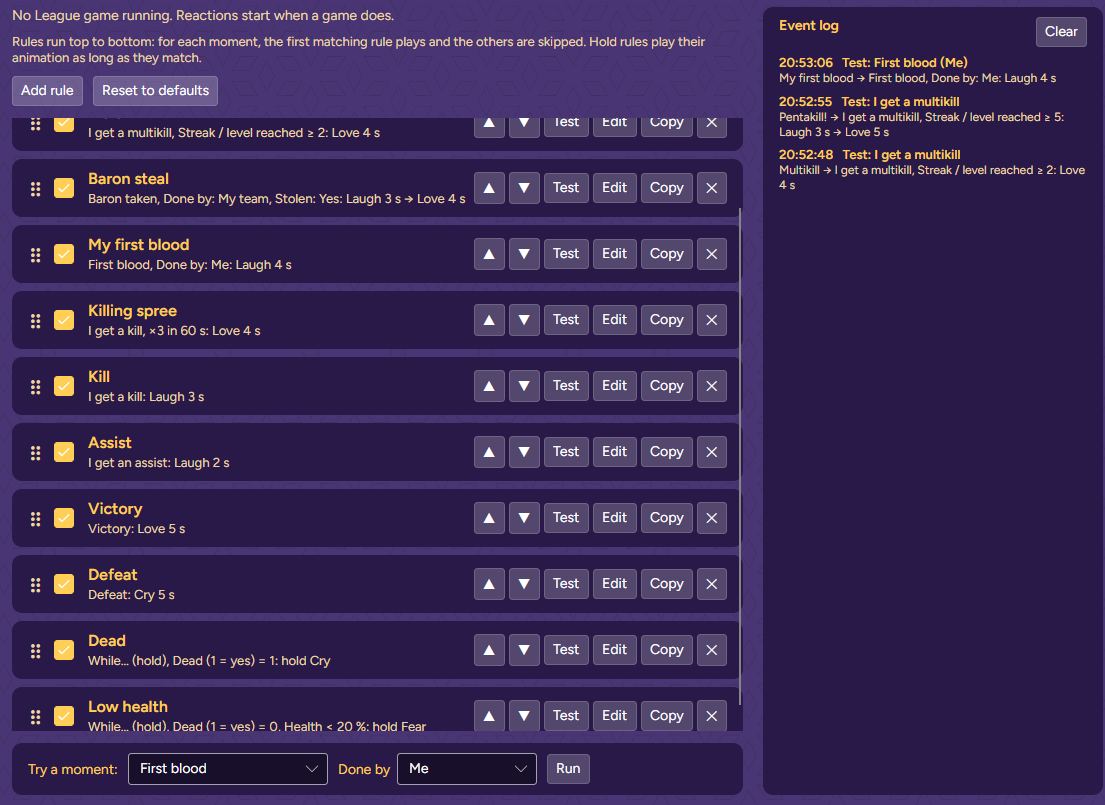
At the bottom of the list, in Try a moment, pick I get a multikill, type 5 in the number box and click Run. Your Mee plays the pentakill and the event log shows Pentakill! → …. Try 2: this time Multikill plays.
 1
2
3
4
1
2
3
4
TipTry a moment only fills in what you set. Anything else a rule checks, like your champion or your health, counts as matching.
Goal: a raid of 50 viewers or more gets a bigger reaction than a small one.
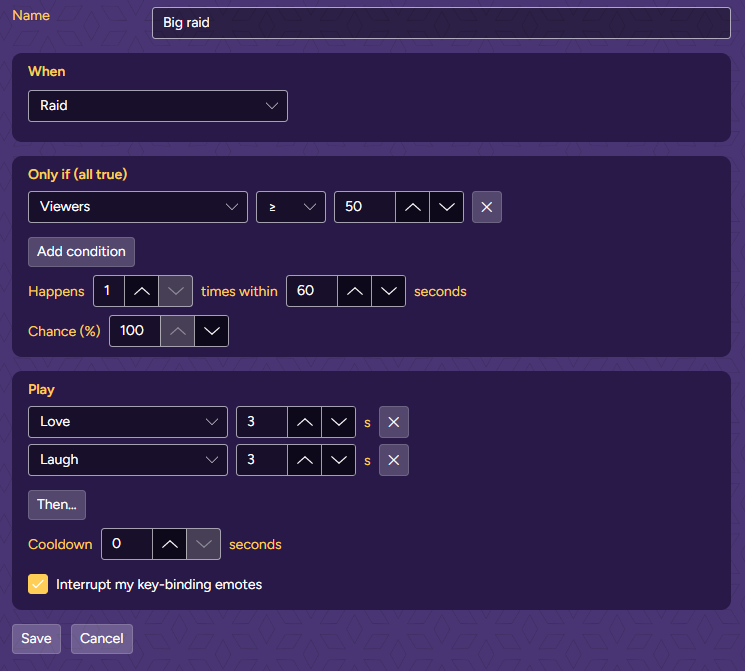
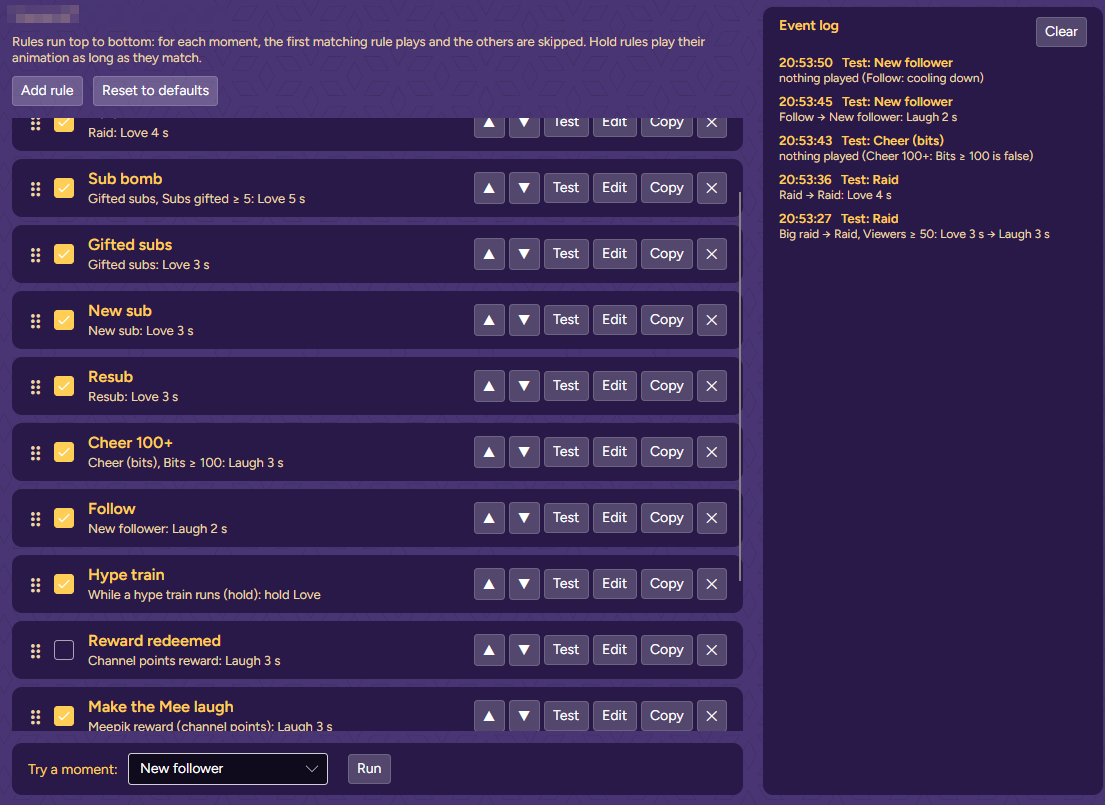
Test it the same way: Try a moment → Raid, type 80, Run. Big raid plays. With 12, the plain Raid plays. The log also says why a moment played nothing, here a 50-bit cheer and a second follow during the cooldown.
 1
2
3
1
2
3
Each recipe is one rule. The settings you don’t mention keep their defaults: chance 100%, no cooldown, happens once.
Your team steals Baron from under the enemy’s nose.
VariantDone by: Enemy team, play Cry, for when they steal yours.
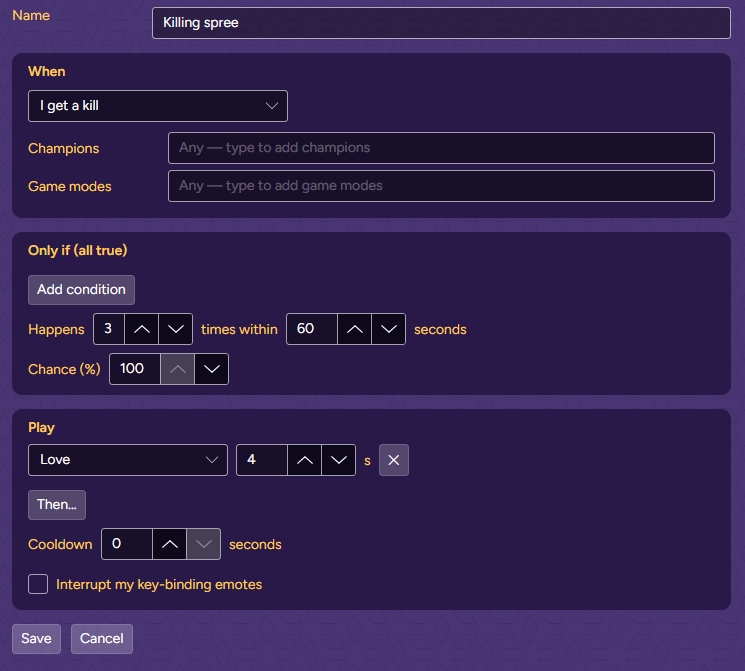
Three kills inside a minute. Each kill counts, and the third one plays it.
OrderPut it above your plain Kill rule.
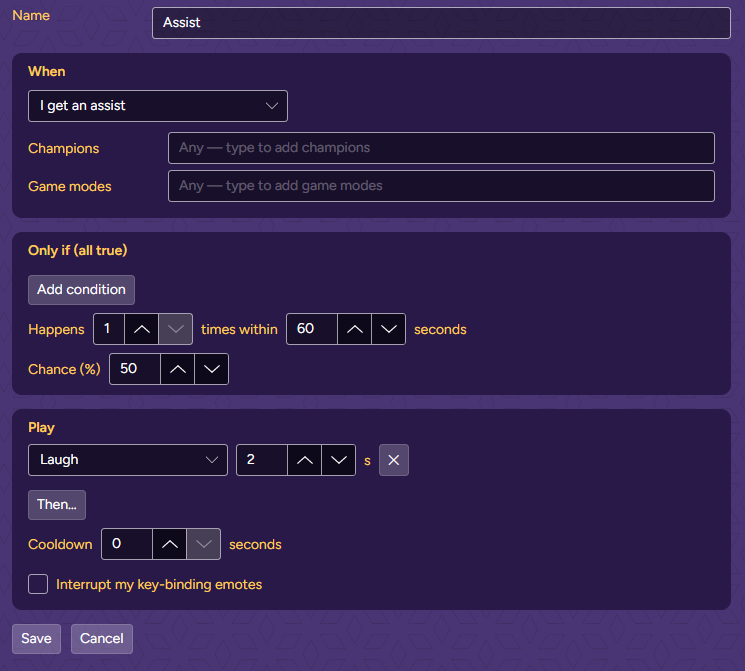
Assists come often. Let only one in two make the Mee laugh.
Good to knowWhen the roll fails, the next rule in the list gets its turn, as if this one didn’t match.
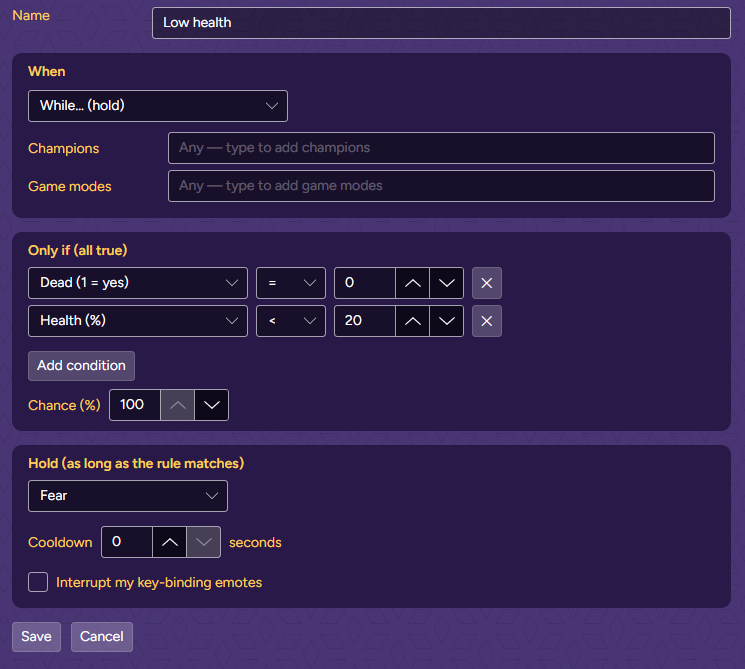
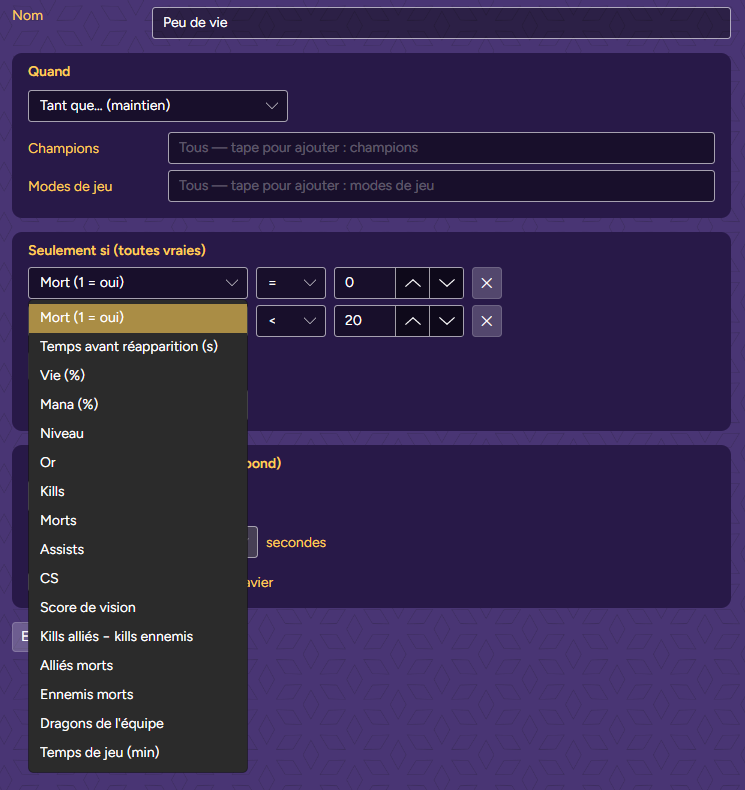
Your Mee looks scared for as long as you’re alive with less than 20% health.
AlsoA second hold rule, Dead (1 = yes) = 1 → Cry, keeps your Mee crying until you respawn.
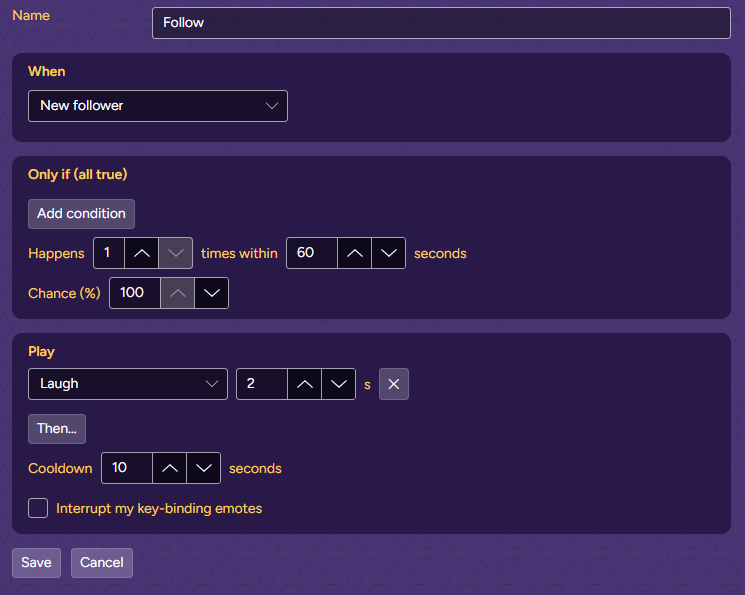
Same idea as Big raid: a specific rule on top, a general one below it.
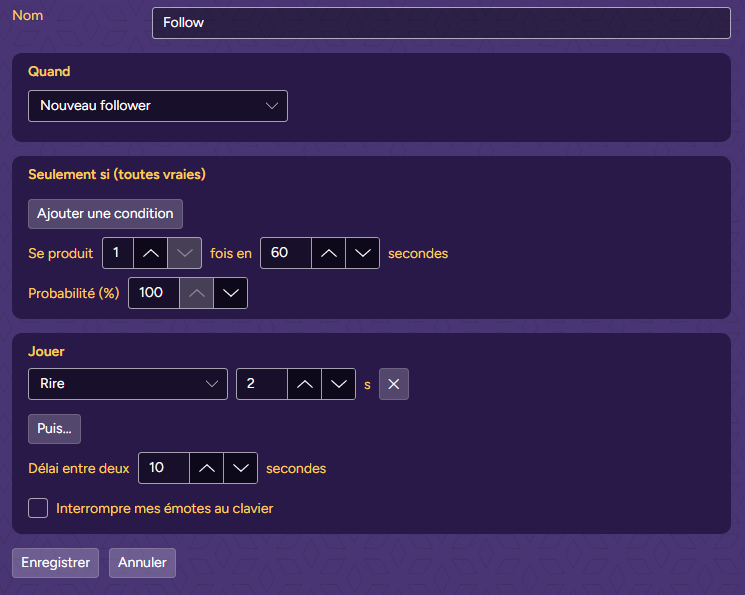
A wave of follows shouldn’t keep your Mee laughing for a minute.
Good to knowDuring the cooldown the log says “cooling down” and the next rule gets its turn.
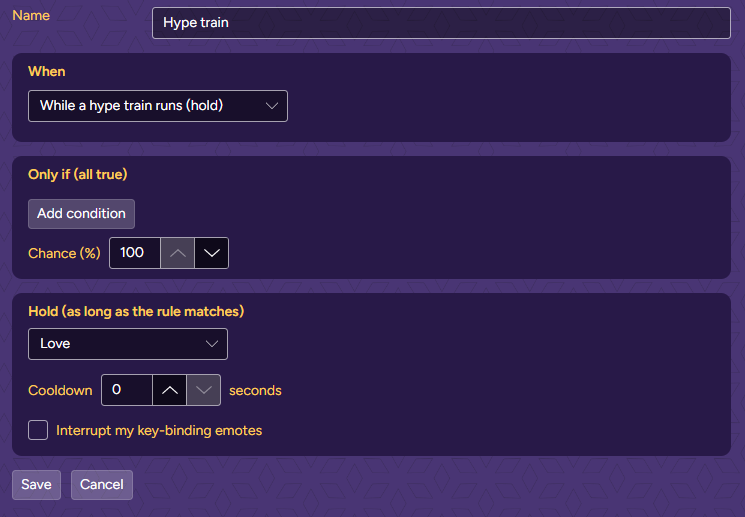
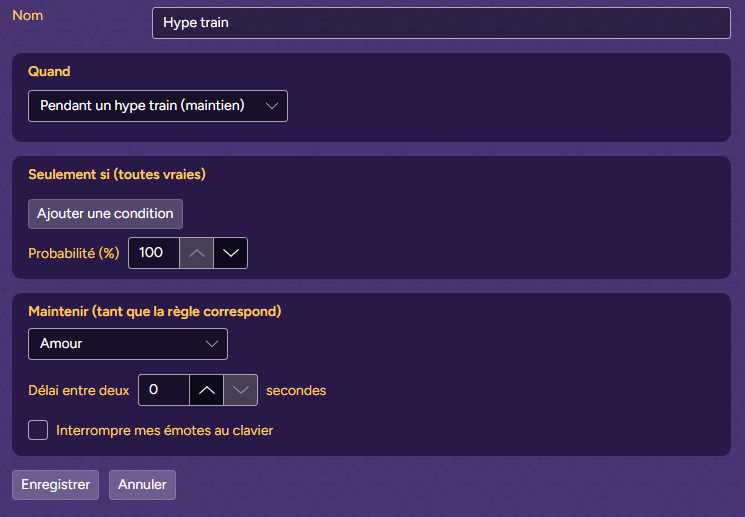
Your Mee shows love for the whole hype train.
VariantAdd Only if Hype train level ≥ 3 to keep it for the big ones.
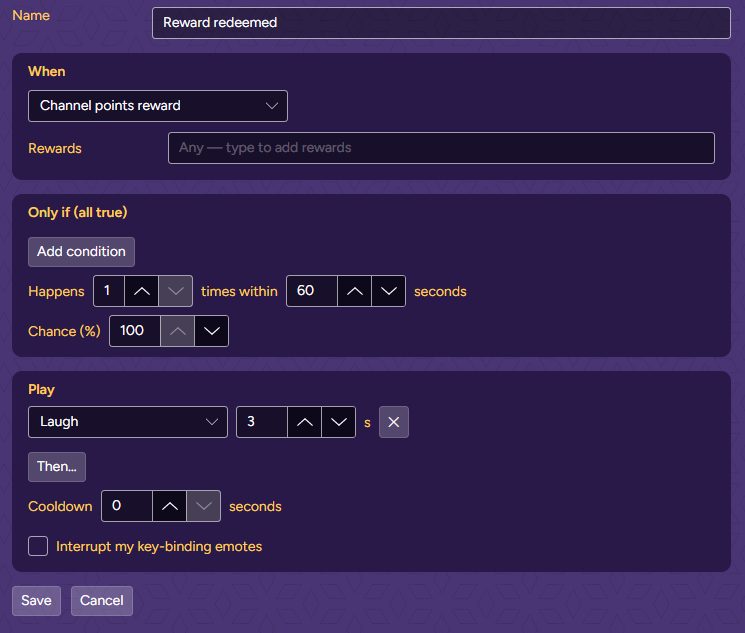
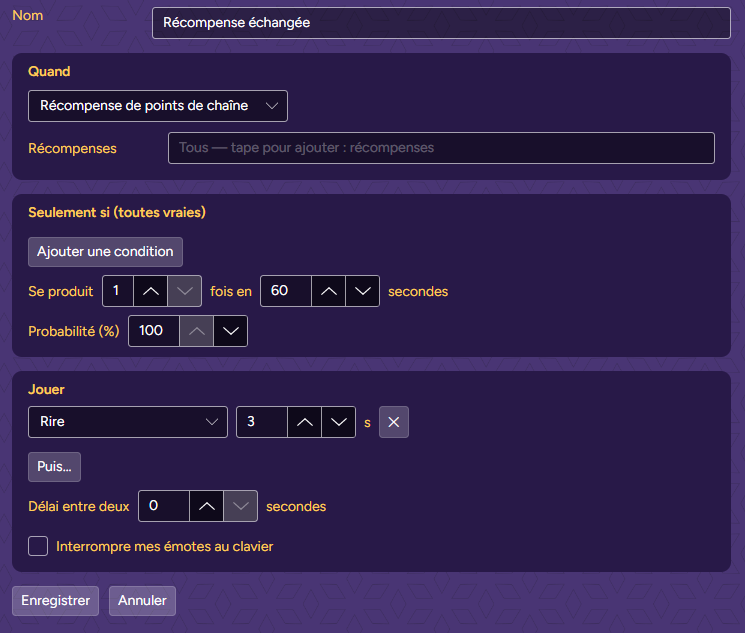
React when a viewer redeems one of your channel’s own rewards.
Off by defaultMeepik’s suggested rules include this one turned off. Tick it in the list to use it.
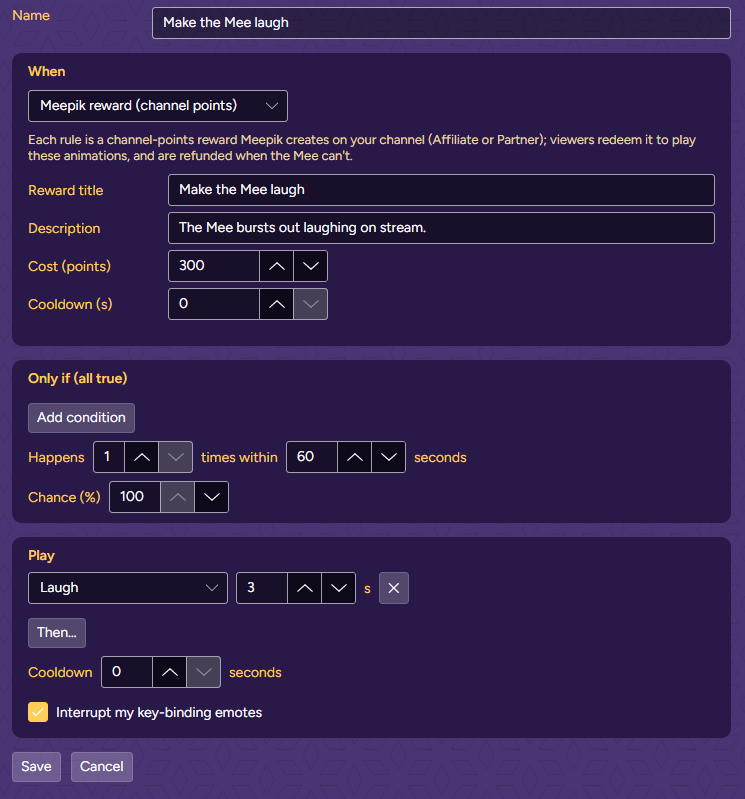
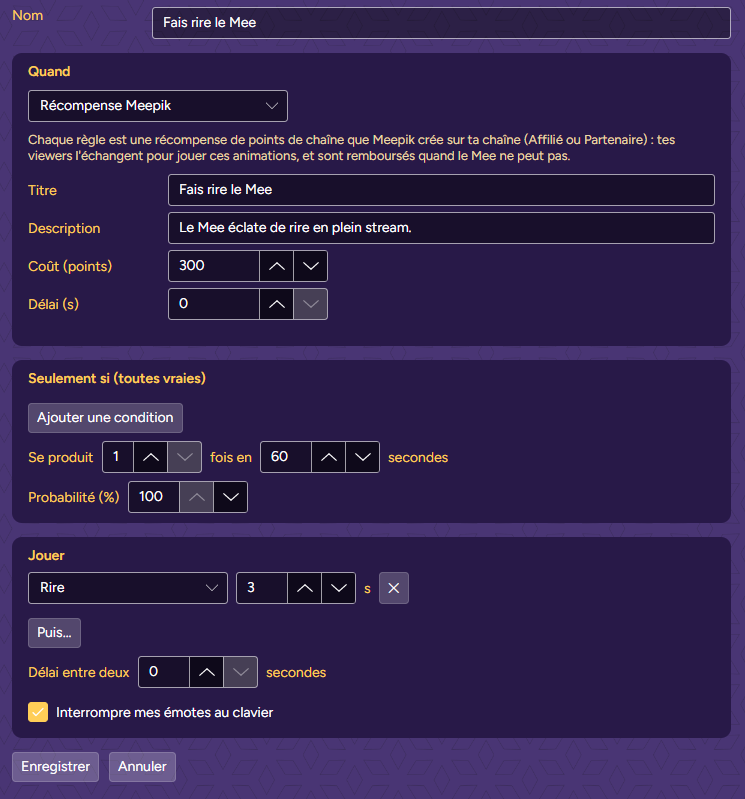
For Affiliates and Partners. Each rule on the Meepik reward (channel points) trigger is a channel-points reward: Meepik creates it on your channel when you save the rule, keeps it up to date, and deletes it if you delete the rule.
Fair to viewersIf the Mee plays it, Meepik completes the redemption. If it can’t, the viewer gets the points back. Meepik pauses its rewards when you close it. Tick Interrupt my key-binding emotes: viewers paid for it.
 1
2
3
4
5
1
2
3
4
5
| Setting | What it does |
|---|---|
| Name | Shown in the list and the event log. Left empty, the rule takes the trigger’s name. |
| When | The trigger. A moment plays once each time it happens. A “hold” trigger plays while the rule matches and stops when it doesn’t. |
| Filters | Narrow the trigger: Done by, Stolen, Dragons, Champions, Game modes, Rewards. Empty or “any” means no limit. Each trigger shows only the filters it supports. |
| Only if (all true) | Conditions on numbers: a number, an operator (< ≤ = ≠ ≥ >) and a value. Every condition must be true. The tables below list the numbers each trigger offers. |
| Happens … times within … seconds | The rule matches on the Nth moment within the time window. Until then the log shows the count, like “2/3 in 60 s”. Moment rules only. |
| Chance (%) | Plays only that share of the time. When the roll fails, the next rule gets its turn. |
| Play · Then… | One or more animations, each with a duration in seconds, played in order. |
| Hold (as long as the rule matches) | For hold rules: one animation, kept on until the conditions stop being true. |
| Cooldown | After playing, the rule rests this many seconds. Moments in between go to the next rule. |
| Interrupt my key-binding emotes | Lets the rule cut in while you hold an emote from your keyboard shortcuts or your Stream Deck. Off, the rule is skipped while one plays. |
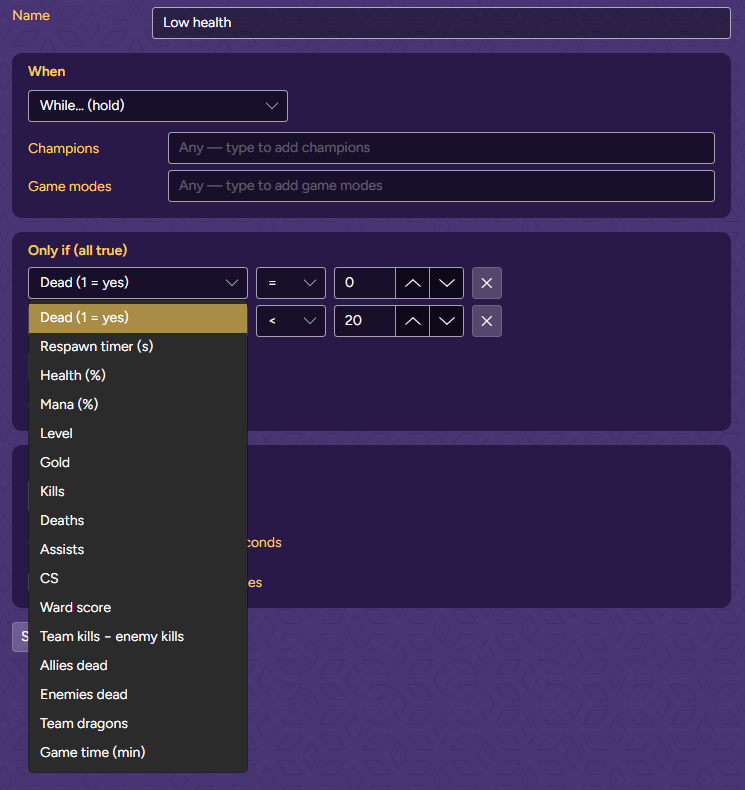
“Live numbers” describe your game right now and work with every trigger:
| Trigger (When) | Kind | Filters | Numbers for “Only if” |
|---|---|---|---|
| I get a kill | Moment | Champions, Game modes | Live numbers |
| I die | Moment | Champions, Game modes | Live numbers |
| I get an assist | Moment | Champions, Game modes | Live numbers |
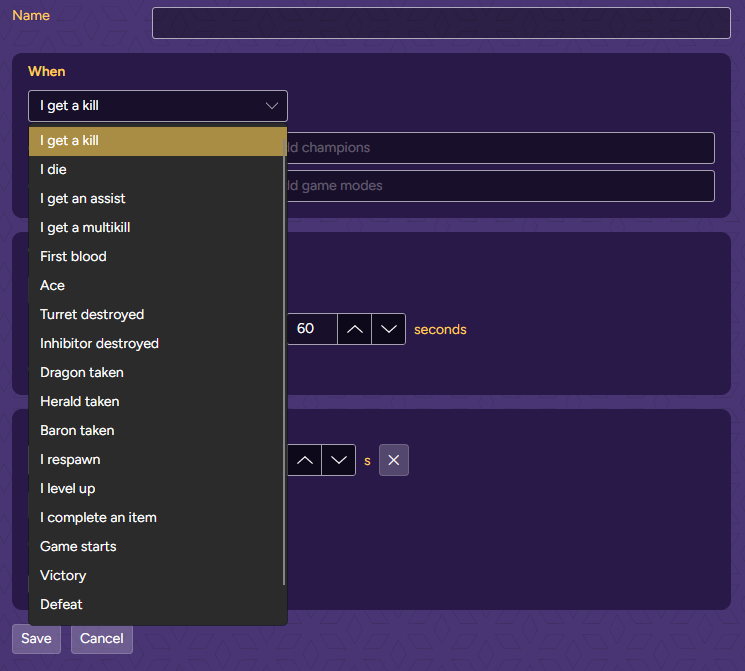
| I get a multikill | Moment | Champions, Game modes | Streak / level reached + Live numbers |
| First blood | Moment | Done by, Champions, Game modes | Live numbers |
| Ace | Moment | Done by, Champions, Game modes | Live numbers |
| Turret destroyed | Moment | Done by, Champions, Game modes | Live numbers |
| Inhibitor destroyed | Moment | Done by, Champions, Game modes | Live numbers |
| Dragon taken | Moment | Done by, Stolen, Dragons, Champions, Game modes | Live numbers |
| Herald taken | Moment | Done by, Stolen, Champions, Game modes | Live numbers |
| Baron taken | Moment | Done by, Stolen, Champions, Game modes | Live numbers |
| I respawn | Moment | Champions, Game modes | Live numbers |
| I level up | Moment | Champions, Game modes | Streak / level reached + Live numbers |
| I complete an item | Moment | Champions, Game modes | Live numbers |
| Game starts | Moment | Champions, Game modes | Live numbers |
| Victory | Moment | Champions, Game modes | Live numbers |
| Defeat | Moment | Champions, Game modes | Live numbers |
| While… (hold) | Hold | Champions, Game modes | Live numbers |
| Trigger (When) | Kind | Filters | Numbers for “Only if” |
|---|---|---|---|
| New follower | Moment | — | — |
| New sub | Moment | — | Sub tier (1–3) |
| Resub | Moment | — | Sub tier (1–3), Months subscribed, Streak (months) |
| Gifted subs | Moment | — | Subs gifted, Sub tier (1–3), Anonymous (1 = yes) |
| Cheer (bits) | Moment | — | Bits, Anonymous (1 = yes) |
| Power-up (bits) | Moment | — | Bits |
| Raid | Moment | — | Viewers |
| Shoutout received | Moment | — | Viewers |
| Charity donation | Moment | — | Amount donated |
| Hype train starts | Moment | — | Hype train level, Hype level progress (%) |
| Hype train levels up | Moment | — | Hype train level, Hype level progress (%) |
| Hype train ends | Moment | — | Hype train level, Hype level progress (%) |
| Channel points reward | Moment | Rewards | Points spent |
| Automatic reward (highlight, gigantify…) | Moment | Rewards | Points spent |
| While a hype train runs (hold) | Hold | — | Hype train level, Hype level progress (%) |
| Meepik reward (channel points) | Moment | — | — |
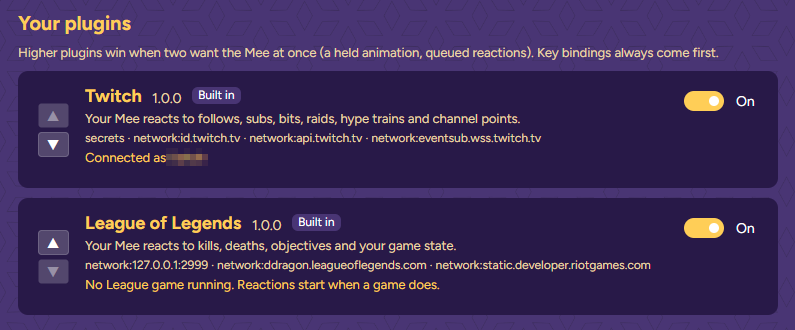
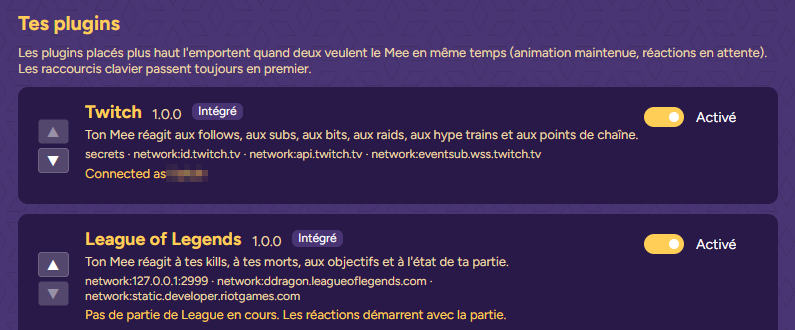
When League and Twitch both want your Mee at the same moment, the plugin higher in Setup → Plugins wins: its held animation stays and its reactions go first. Stream plugins start above game plugins. Your own key bindings and Stream Deck emotes always come before any plugin.
 1
2
1
2
With the Meepik plugin for Stream Deck (7.1 or later), a key can switch one rule on and off mid-stream, for example muting follow alerts during a cutscene.
Plugin on/off does the same for a whole plugin, like all Twitch reactions while you’re on a break.
Start with the Event log: every moment shows up there with what happened.
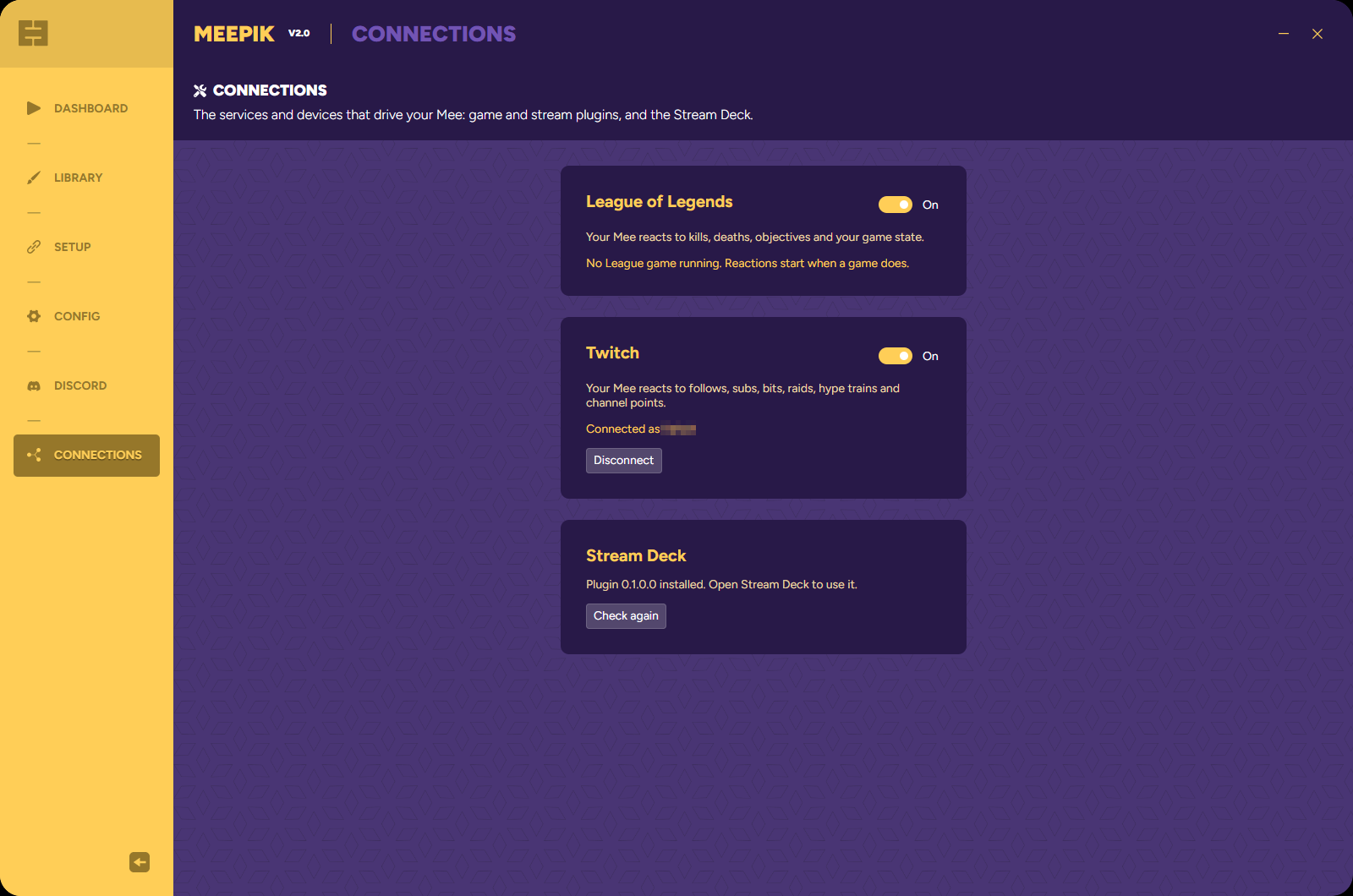
no rule for thisNo rule that’s on uses this trigger. Add one, or tick the one you have.nothing played (Cheer 100+: Bits ≥ 100 is false)A rule exists, but a condition was false. The log names the first rule it tried and the failed condition.2/3 in 60 sA “Happens … times” rule is still counting.not this time (50% chance)The chance roll failed.cooling downThe rule played less than its cooldown ago.a key-binding emote is playingYou’re holding an emote. Tick Interrupt my key-binding emotes on rules that should cut in.this Mee has no 'Dance' animationPick another animation, or switch to a Mee that has it. The rule shows the same warning in red in the list.dropped: 3 reactions already waitingToo many moments at once. Meepik keeps the queue short so your Mee never lags minutes behind.locked: plugin reactions need a subscriptionGame and stream reactions need a Meepik subscription.the Mee isn't runningShow your Mee from the Dashboard first.Check that the plugin is on in Connections. Its status says “No League game running” until the match itself has loaded; the lobby and champion select don’t count. If you open Meepik well after the match started, the moments that already happened aren’t replayed.
The first matching rule wins. Move the specific rule (Pentakill!, Big raid, Sub bomb) above the general one.
Test only plays the animations. Try a moment runs the whole list as if the moment happened, so use it to check the order and the conditions.
Channel-points rewards need an Affiliate or Partner channel. Check that Twitch is connected in Connections and look at the Twitch event log for an error.
It holds as long as all its conditions are true. Check them in the editor, for example Dead (1 = yes) = 0 next to Health (%) < 20, so the scared face stops when you die.
Les règles disent à ton Mee quoi jouer quand il se passe quelque chose : un pentakill, un raid, une pluie de subs, un combat à peu de vie. Ce guide t’aide à créer tes premières règles, te donne des recettes à copier et explique chaque réglage.
Animations. Une règle joue les animations de ton Mee. Chaque Mee a les cinq émotions ci-dessous, certains en ont plus. Si tu choisis une animation que ton Mee actuel n’a pas, la règle affiche un avertissement en rouge et elle est ignorée.
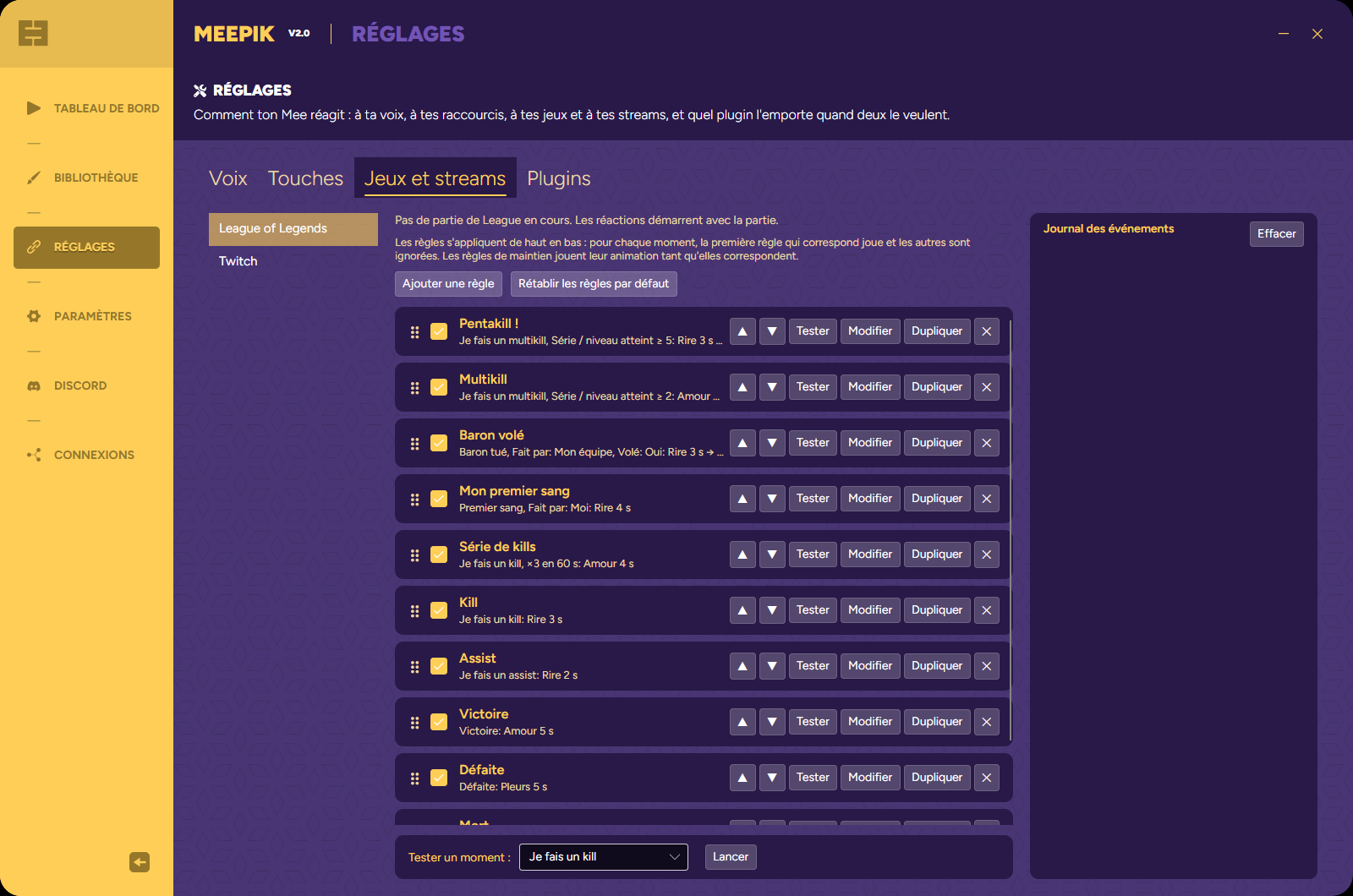
Chaque plugin a sa propre liste de règles. Quand il se passe quelque chose dans ta partie ou sur ton stream (un moment), Meepik parcourt la liste de haut en bas. La première règle qui correspond joue, et celles du dessous sont ignorées. Place les règles précises au-dessus des règles générales : Pentakill ! au-dessus de Multikill, Gros raid au-dessus de Raid.
Il y a deux sortes de règles. Les règles de moment jouent une fois, pour un kill ou un follow. Les règles de maintien (les déclencheurs marqués « maintien ») gardent une animation sur ton Mee tant que leurs conditions restent vraies, comme « tant que j’ai moins de 20 % de vie ».
 1
2
3
4
5
6
7
8
9
1
2
3
4
5
6
7
8
9
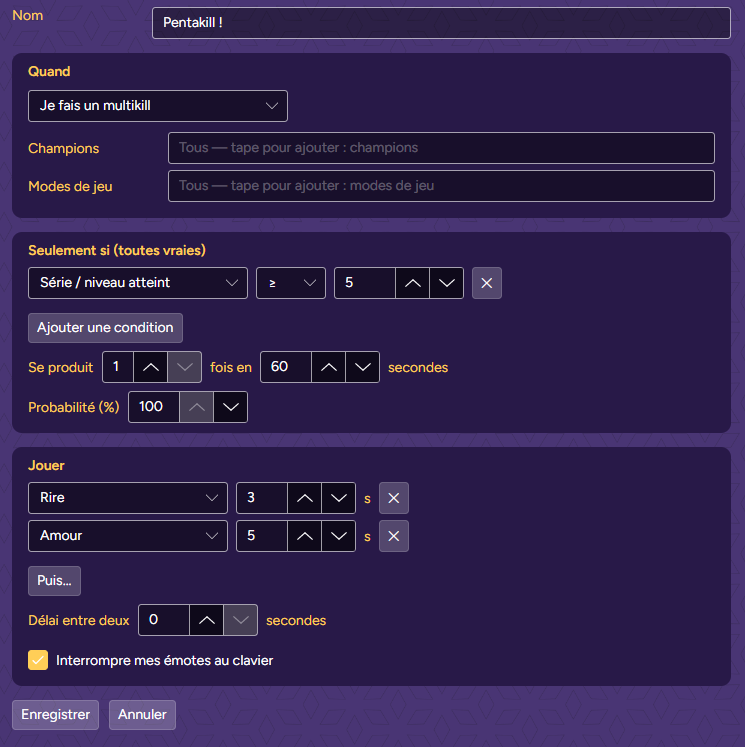
La ligne grise sous le nom de chaque règle la résume : le déclencheur, ses filtres et conditions, puis ce qui joue, par exemple Je fais un multikill, Série / niveau atteint ≥ 5: Rire 3 s → Amour 5 s.
Objectif : quand tu fais un pentakill, ton Mee éclate de rire puis envoie de l’amour, même si tu tiens une émote au clavier à ce moment-là.
 1
2
3
4
5
6
7
8
9
1
2
3
4
5
6
7
8
9
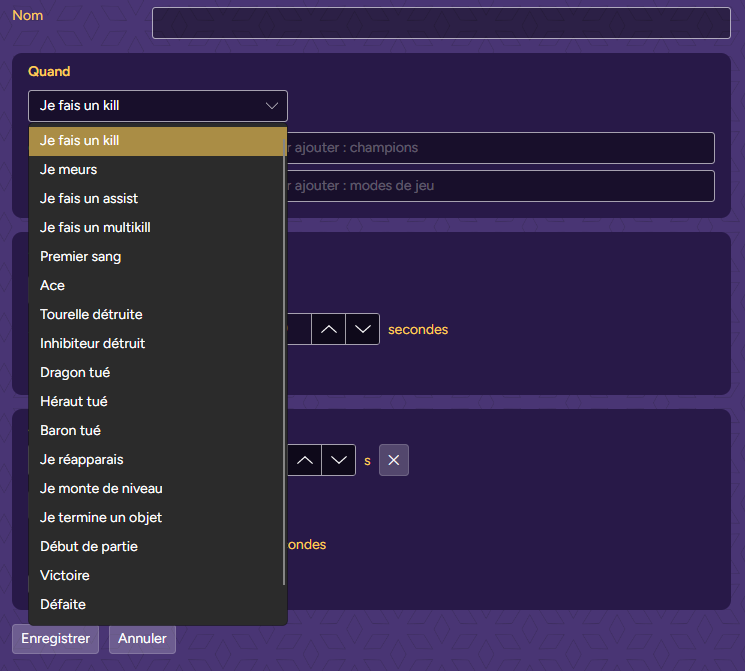
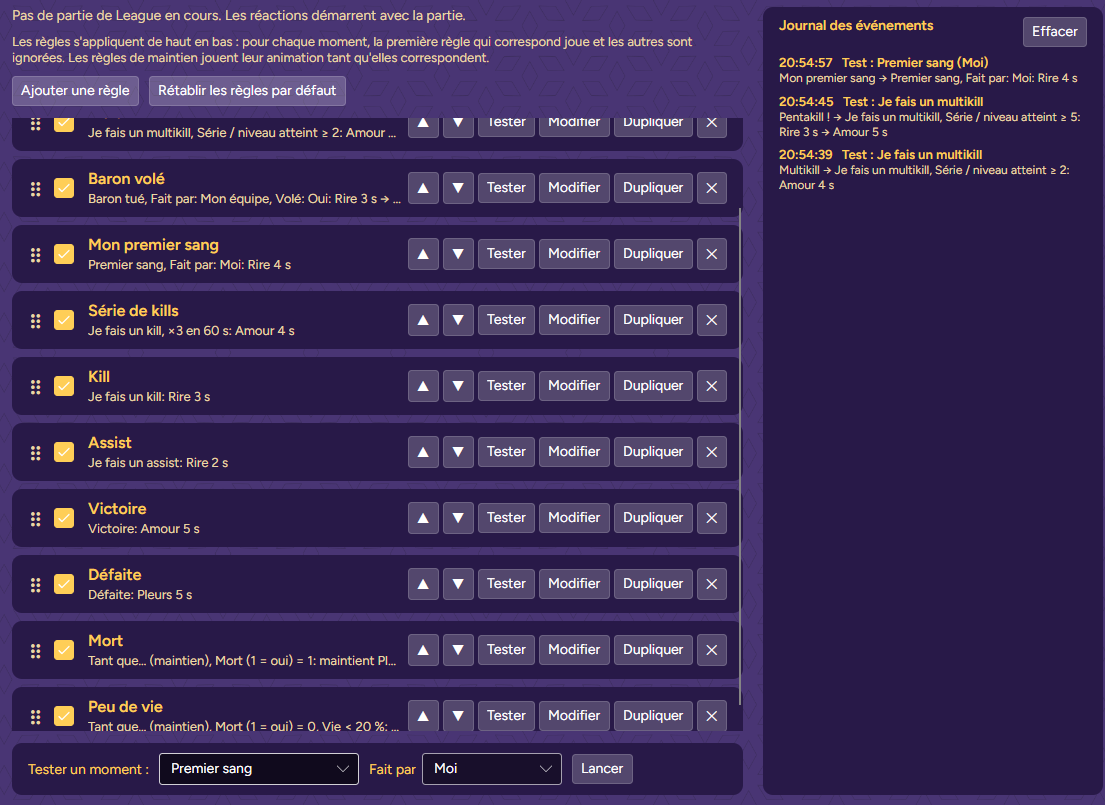
En bas de la liste, dans Tester un moment, choisis Je fais un multikill, tape 5 dans la case du nombre et clique sur Lancer. Ton Mee joue le pentakill et le journal affiche Pentakill ! → …. Essaie avec 2 : cette fois, c’est Multikill qui joue.
 1
2
3
4
1
2
3
4
AstuceTester un moment ne remplit que ce que tu règles. Tout ce qu’une règle vérifie d’autre, comme ton champion ou ta vie, compte comme valide.
Objectif : un raid de 50 viewers ou plus déclenche une plus grosse réaction qu’un petit raid.
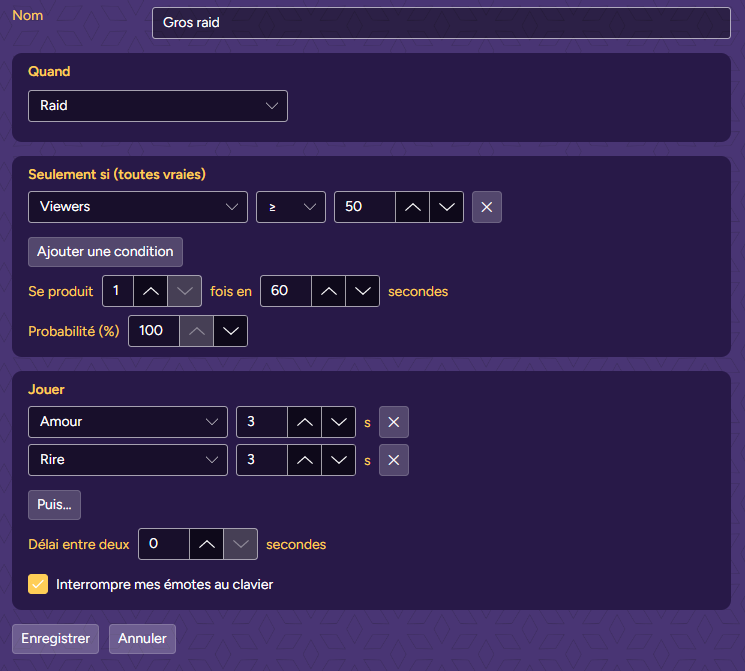
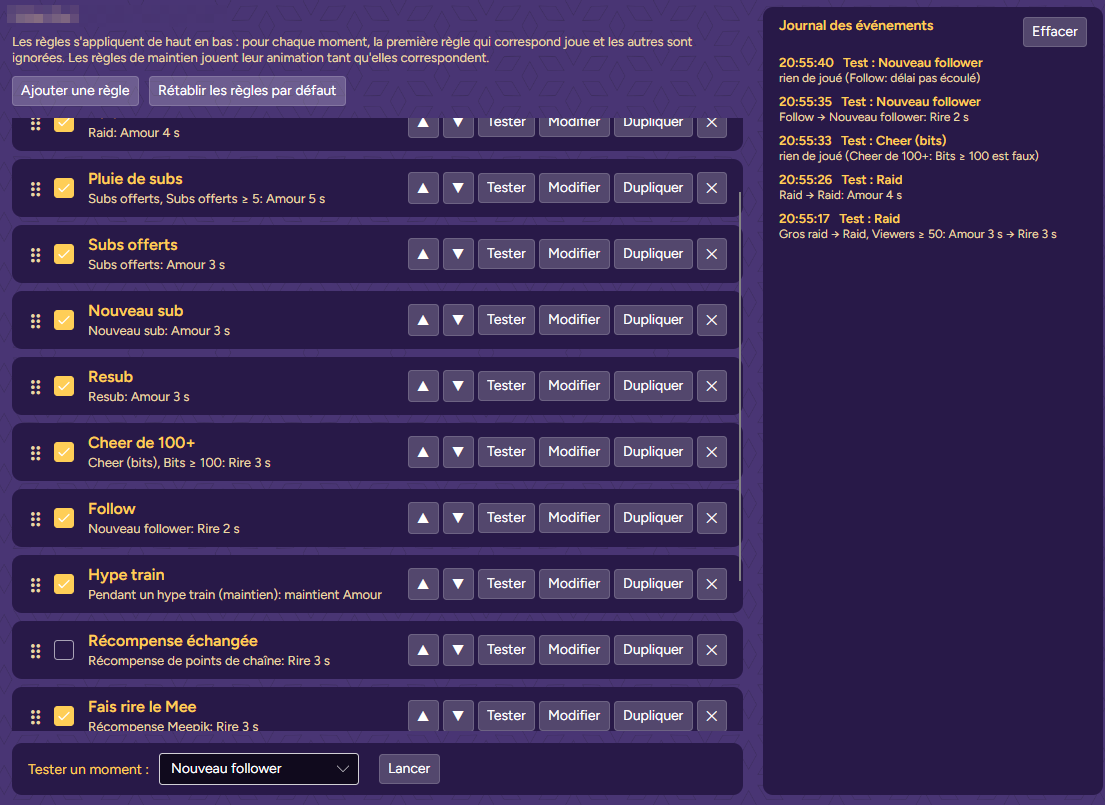
Teste-la de la même façon : Tester un moment → Raid, tape 80, Lancer. Gros raid joue. Avec 12, c’est Raid qui joue. Le journal explique aussi pourquoi un moment n’a rien joué, ici un cheer de 50 bits et un deuxième follow pendant le délai.
 1
2
3
1
2
3
Chaque recette est une règle. Les réglages non cités gardent leur valeur par défaut : probabilité 100 %, pas de délai, se produit une fois.
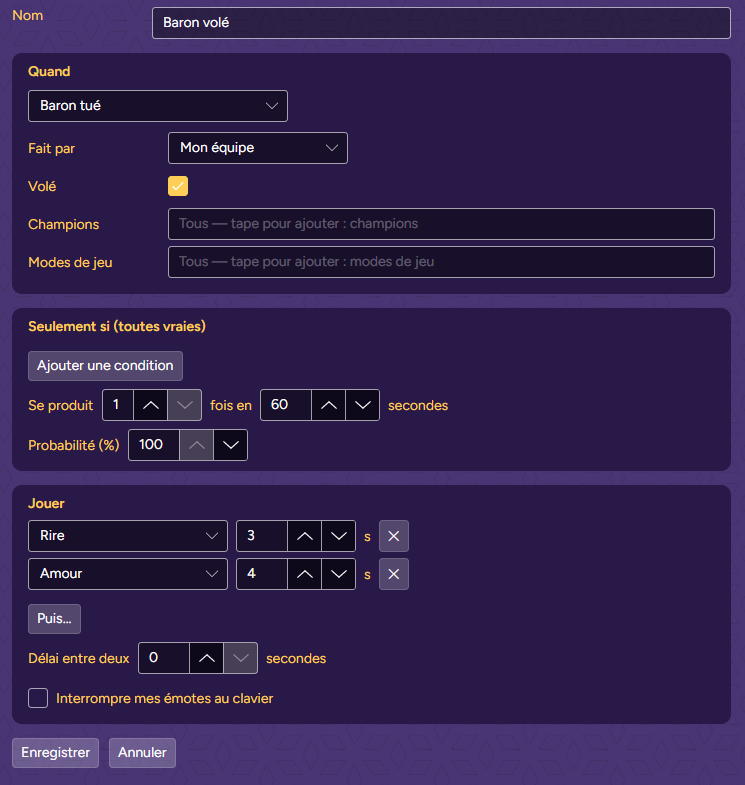
Ton équipe vole le Baron sous le nez de l’adversaire.
VarianteFait par : L’équipe ennemie, avec Pleurs, pour quand on te le vole.
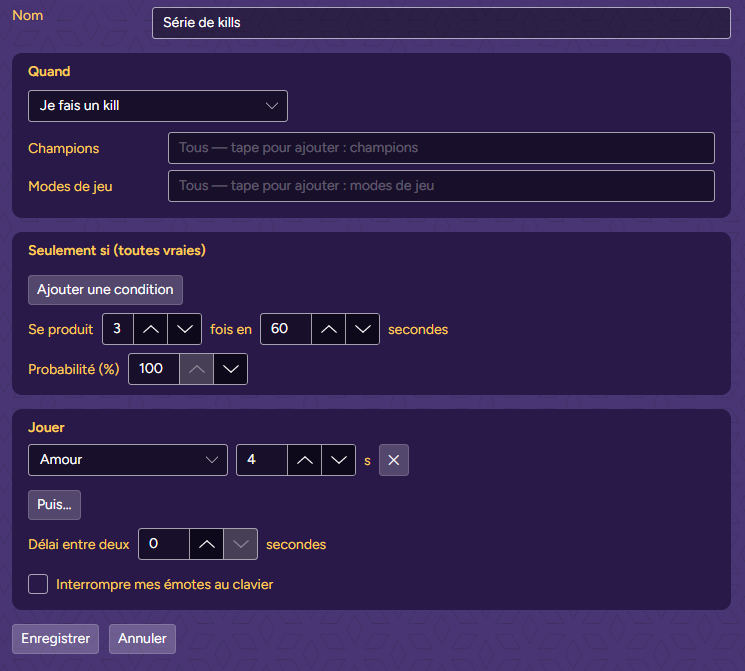
Trois kills en moins d’une minute. Chaque kill compte, et le troisième déclenche la règle.
OrdrePlace-la au-dessus de ta règle Kill simple.
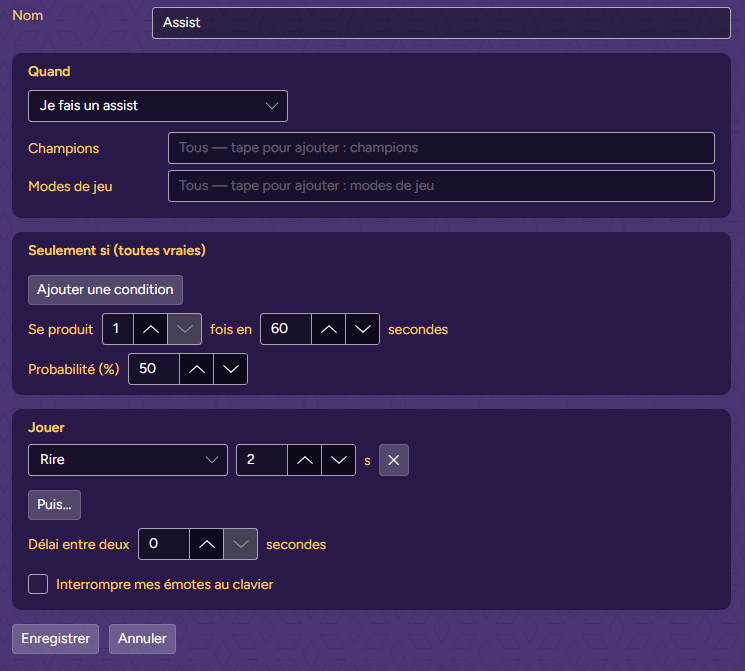
Les assists arrivent souvent. Fais rire ton Mee une fois sur deux seulement.
Bon à savoirQuand le tirage échoue, la règle suivante de la liste prend le relais, comme si celle-ci ne correspondait pas.
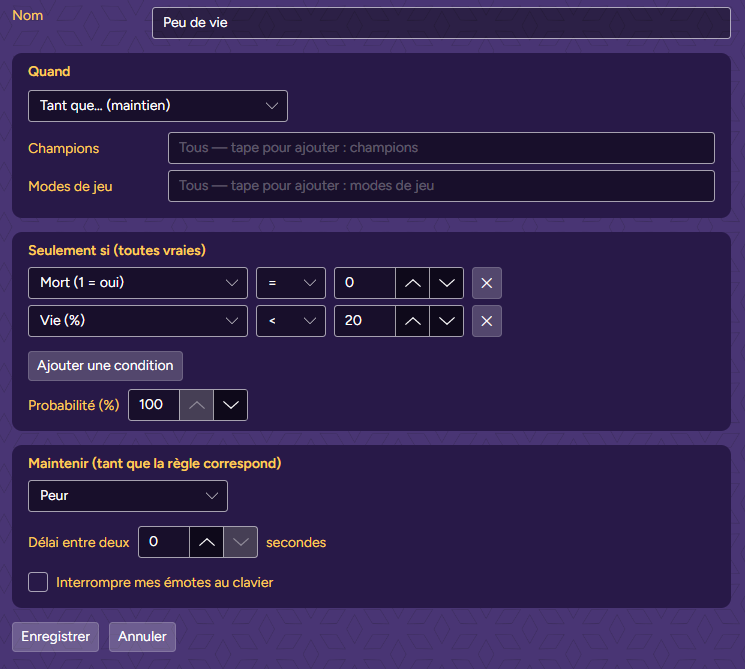
Ton Mee a peur tant que tu es en vie avec moins de 20 % de vie.
En plusUne deuxième règle de maintien, Mort (1 = oui) = 1 → Pleurs, fait pleurer ton Mee jusqu’à ta réapparition.
Même principe que Gros raid : une règle précise en haut, une règle générale en dessous.
Une vague de follows ne doit pas faire rire ton Mee pendant une minute.
Bon à savoirPendant le délai, le journal indique « délai pas écoulé » et la règle suivante prend le relais.
Ton Mee envoie de l’amour pendant tout le hype train.
VarianteAjoute Seulement si Niveau du hype train ≥ 3 pour le garder pour les gros.
Réagis quand un viewer échange une des récompenses de ta chaîne.
Désactivée au départLes règles proposées par Meepik la contiennent, désactivée. Coche-la dans la liste pour l’utiliser.
Pour les Affiliés et Partenaires. Chaque règle du déclencheur Récompense Meepik est une récompense de points de chaîne : Meepik la crée sur ta chaîne quand tu enregistres la règle, la tient à jour, et la supprime si tu supprimes la règle.
Juste pour les viewersSi le Mee la joue, Meepik valide l’échange. S’il ne peut pas, le viewer récupère ses points. Meepik met ses récompenses en pause quand tu le fermes. Coche Interrompre mes émotes au clavier : tes viewers ont payé.
 1
2
3
4
5
1
2
3
4
5
| Réglage | Ce qu’il fait |
|---|---|
| Nom | Affiché dans la liste et dans le journal. Laissé vide, la règle prend le nom du déclencheur. |
| Quand | Le déclencheur. Un moment joue une fois à chaque fois qu’il arrive. Un déclencheur « maintien » joue tant que la règle correspond et s’arrête quand ce n’est plus le cas. |
| Filtres | Précisent le déclencheur : Fait par, Volé, Dragons, Champions, Modes de jeu, Récompenses. Vide ou « tous » : aucune limite. Chaque déclencheur n’affiche que ses filtres. |
| Seulement si (toutes vraies) | Des conditions sur des nombres : un nombre, un opérateur (< ≤ = ≠ ≥ >) et une valeur. Toutes doivent être vraies. Les tableaux plus bas listent les nombres de chaque déclencheur. |
| Se produit … fois en … secondes | La règle correspond au Nᵉ moment dans la fenêtre de temps. En attendant, le journal affiche le compte, comme « 2/3 en 60 s ». Règles de moment seulement. |
| Probabilité (%) | Ne joue que cette part du temps. Quand le tirage échoue, la règle suivante prend le relais. |
| Jouer · Puis… | Une ou plusieurs animations, chacune avec une durée en secondes, jouées dans l’ordre. |
| Maintenir (tant que la règle correspond) | Pour les règles de maintien : une animation, gardée jusqu’à ce que les conditions ne soient plus vraies. |
| Délai entre deux | Après avoir joué, la règle se repose ce nombre de secondes. Les moments pendant ce temps passent à la règle suivante. |
| Interrompre mes émotes au clavier | Laisse la règle passer devant une émote que tu tiens avec tes raccourcis clavier ou ton Stream Deck. Décoché, la règle est ignorée pendant l’émote. |
Les « nombres en direct » décrivent ta partie à l’instant et marchent avec tous les déclencheurs :
| Déclencheur (Quand) | Type | Filtres | Nombres pour « Seulement si » |
|---|---|---|---|
| Je fais un kill | Moment | Champions, Modes de jeu | Nombres en direct |
| Je meurs | Moment | Champions, Modes de jeu | Nombres en direct |
| Je fais un assist | Moment | Champions, Modes de jeu | Nombres en direct |
| Je fais un multikill | Moment | Champions, Modes de jeu | Série / niveau atteint + Nombres en direct |
| Premier sang | Moment | Fait par, Champions, Modes de jeu | Nombres en direct |
| Ace | Moment | Fait par, Champions, Modes de jeu | Nombres en direct |
| Tourelle détruite | Moment | Fait par, Champions, Modes de jeu | Nombres en direct |
| Inhibiteur détruit | Moment | Fait par, Champions, Modes de jeu | Nombres en direct |
| Dragon tué | Moment | Fait par, Volé, Dragons, Champions, Modes de jeu | Nombres en direct |
| Héraut tué | Moment | Fait par, Volé, Champions, Modes de jeu | Nombres en direct |
| Baron tué | Moment | Fait par, Volé, Champions, Modes de jeu | Nombres en direct |
| Je réapparais | Moment | Champions, Modes de jeu | Nombres en direct |
| Je monte de niveau | Moment | Champions, Modes de jeu | Série / niveau atteint + Nombres en direct |
| Je termine un objet | Moment | Champions, Modes de jeu | Nombres en direct |
| Début de partie | Moment | Champions, Modes de jeu | Nombres en direct |
| Victoire | Moment | Champions, Modes de jeu | Nombres en direct |
| Défaite | Moment | Champions, Modes de jeu | Nombres en direct |
| Tant que… (maintien) | Maintien | Champions, Modes de jeu | Nombres en direct |
| Déclencheur (Quand) | Type | Filtres | Nombres pour « Seulement si » |
|---|---|---|---|
| Nouveau follower | Moment | — | — |
| Nouveau sub | Moment | — | Niveau du sub (1–3) |
| Resub | Moment | — | Niveau du sub (1–3), Mois d'abonnement, Série (mois) |
| Subs offerts | Moment | — | Subs offerts, Niveau du sub (1–3), Anonyme (1 = oui) |
| Cheer (bits) | Moment | — | Bits, Anonyme (1 = oui) |
| Power-up (bits) | Moment | — | Bits |
| Raid | Moment | — | Viewers |
| Shoutout reçu | Moment | — | Viewers |
| Don caritatif | Moment | — | Montant donné |
| Début du hype train | Moment | — | Niveau du hype train, Progression du niveau (%) |
| Le hype train monte de niveau | Moment | — | Niveau du hype train, Progression du niveau (%) |
| Fin du hype train | Moment | — | Niveau du hype train, Progression du niveau (%) |
| Récompense de points de chaîne | Moment | Récompenses | Points dépensés |
| Récompense automatique (mise en avant, emote géante…) | Moment | Récompenses | Points dépensés |
| Pendant un hype train (maintien) | Maintien | — | Niveau du hype train, Progression du niveau (%) |
| Récompense Meepik | Moment | — | — |
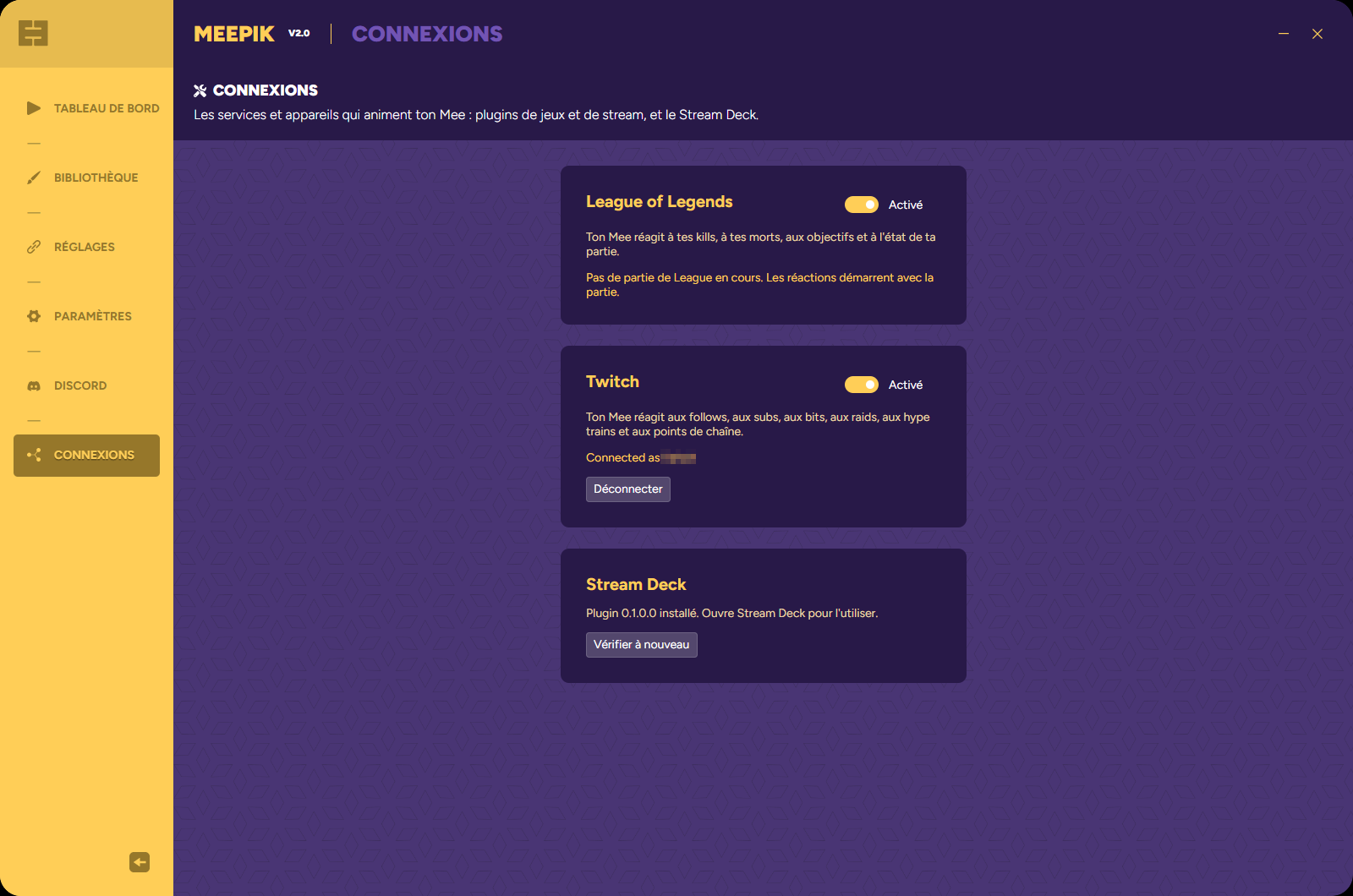
Quand League et Twitch veulent ton Mee au même moment, le plugin placé le plus haut dans Réglages → Plugins l’emporte : son animation maintenue reste et ses réactions passent en premier. Les plugins de stream commencent au-dessus des plugins de jeu. Tes raccourcis clavier et les émotes de ton Stream Deck passent toujours avant les plugins.
 1
2
1
2
Avec le plugin Meepik pour Stream Deck (7.1 ou plus récent), une touche peut activer ou désactiver une règle en plein live, par exemple couper les alertes de follow pendant une cinématique.
Plugin on/off fait la même chose pour tout un plugin, comme toutes les réactions Twitch pendant une pause.
Commence par le Journal des événements : chaque moment y apparaît avec son résultat.
aucune règle pour çaAucune règle active n’utilise ce déclencheur. Ajoutes-en une, ou coche celle que tu as.rien de joué (Cheer de 100+: Bits ≥ 100 est faux)Une règle existe, mais une condition était fausse. Le journal nomme la première règle essayée et la condition qui a échoué.2/3 en 60 sUne règle « Se produit … fois » est encore en train de compter.pas cette fois (50 % de chances)Le tirage de probabilité a échoué.délai pas écouléLa règle a joué il y a moins longtemps que son délai.une émote au clavier est en coursTu tiens une émote. Coche Interrompre mes émotes au clavier sur les règles qui doivent passer devant.ce Mee n'a pas d'animation « Dance »Choisis une autre animation, ou passe à un Mee qui l’a. La règle affiche le même avertissement en rouge dans la liste.abandonné : 3 réactions déjà en attenteTrop de moments d’un coup. Meepik garde la file courte pour que ton Mee ne soit jamais en retard de plusieurs minutes.verrouillé : les réactions des plugins nécessitent un abonnementLes réactions aux jeux et aux streams nécessitent un abonnement Meepik.le Mee n'est pas lancéAffiche d’abord ton Mee depuis le Tableau de bord.Vérifie que le plugin est activé dans Connexions. Son statut indique « Pas de partie de League en cours » tant que la partie elle-même n’est pas chargée ; le salon et la sélection des champions ne comptent pas. Si tu ouvres Meepik longtemps après le début de la partie, les moments déjà passés ne sont pas rejoués.
La première règle qui correspond l’emporte. Monte la règle précise (Pentakill !, Gros raid, Pluie de subs) au-dessus de la règle générale.
Tester ne fait que jouer les animations. Tester un moment fait passer le moment dans toute la liste, comme s’il avait eu lieu : utilise-le pour vérifier l’ordre et les conditions.
Les récompenses de points de chaîne nécessitent une chaîne Affiliée ou Partenaire. Vérifie que Twitch est connecté dans Connexions et regarde le journal Twitch pour une erreur.
Elle tient tant que toutes ses conditions sont vraies. Vérifie-les dans l’éditeur, par exemple Mort (1 = oui) = 0 à côté de Vie (%) < 20, pour que la peur s’arrête quand tu meurs.